

We research everything we recommend. When you buy through our links, we may earn a commission. Learn more

Buying guide · 11 min read · Updated October 2, 2026

6 Best Budget WiFi Routers for RVs in 2026: A Practical RV Guide

Six budget WiFi routers for RVs, judged on coverage inside a metal-skinned rig, client count and 2.4 versus 5 GHz reach, not just the internet source.

Bowen HigginsBy Bowen HigginsRV Editor at RV Gear Lab6 products comparedSpec-sheet researched

At a glance

Our top picks

Buyers shopping for an RV WiFi router usually ask where the internet will come from, but the second half of the job gets less attention: getting that signal to every corner of a rig whose walls and roof are wrapped in metal. An aluminium skin, foil insulation and a steel frame reflect and soak up radio waves in ways a drywall apartment never does. The router that covers an apartment on paper can leave the bedroom end of a fifth wheel without a bar.

This guide looks at the LAN side, meaning the WiFi your own devices join, and treats the internet source as a separate input. Three of the six picks have a SIM slot and act as their own source. Two are plain home routers that wait for an Ethernet feed from a cellular modem or a campground jack. One is a pocket hotspot. Each lands differently depending on how long your rig is and how many screens run at once.

Two numbers deserve scepticism: the advertised speed and the advertised client count. A 5 GHz band is quick but loses range at the first metal wall, while 2.4 GHz is slower and carries farther through a cabin. Client counts are ceilings, not promises. The ordering below runs from the most expensive pick to the least, with notes on what each step buys.

RV Gear Lab field notes

The Rig Fit Check

Start with the job
Dionlink Dual Band 4G LTE Router with SIM Card Slot leads this shortlist for Rigs that want a SIM source and dual-band coverage in a single box.. Use that fit as a reference point, then compare the alternatives against your own space and workload.
Specs that separate the picks
The first details to compare are AC1200 dual-band, 6 antennas, Wi-Fi 7 BE3600, 4 antennas, Modem plus AC1200 dual-band router. Confirm the exact model and included components before ordering.
Trade-off to plan for
Lists AT&T and T-Mobile support only

Before you buy

What Matters Before You Choose a Budget WiFi Router for RVs

Key buying criteria so you get the right fit the first time.

  1. 01

    Coverage inside a metal-skinned rig

    Advertised square footage assumes wood-frame walls, and an RV has aluminium siding, foil-faced insulation and metal framing that reflect or absorb WiFi. Even a router that covers an apartment can leave the far bedroom dark in a 40-foot fifth wheel. Placement matters as much as the model: central and elevated beats a corner cabinet. Look for external or beamforming antennas and a 2.4 GHz band, which carries farther through a cabin than 5 GHz.

  2. 02

    2.4 versus 5 GHz reach

    The 5 GHz band is faster, with less crowding, and it loses range quickly through walls. The 2.4 GHz band is slower and travels farther, but a crowded campground fills it with neighbors. A dual-band router lets each device pick, yet phones often stick to the stronger-looking band regardless of throughput. Look for separate speeds listed for both bands, such as 300 Mbps on 2.4 and 900 Mbps on 5.

  3. 03

    Client count versus real use

    A stated device count is a ceiling set by the chipset, not a promise of smooth streaming. Four phones, two tablets, a TV, a stick and two laptops already pass ten devices before smart gadgets join. Budget routers that list 10 clients choke earlier than ones that list 32 or 60. Count what you own and buy at least double the visible number for steady use.

  4. 04

    Campground WiFi as an uplink

    Many travel routers turn campground WiFi into your private network, a job called WISP or client mode. Quality follows the park's signal, and a router with a better antenna reaches a distant access point more reliably. A VPN client on the router protects every device at once. Look for client mode or public WiFi sharing in the feature list.

  5. 05

    Wired ports for fixed gear

    A cable beats WiFi for a work laptop on a video call or a smart TV that streams all evening. The ports also let you attach a second access point to reach the back of a long rig. Count the LAN ports, check whether any are multi-gig, and make sure one is a WAN port if you plan to feed it from a modem or park jack.

  6. 06

    Power draw and input

    Anything that runs from USB, a 5V adapter or a 12V input can live on the house battery. A home router with a wall brick needs the inverter running to stay online. Over a week of boondocking, that idle draw adds up. Check the power input in the listing and plan where the cable will run.

Our standards

Why You Can Trust RV Gear Lab

At RV Gear Lab, we compare products based on rig fit and power or hookup compatibility, verified specifications, usability, setup requirements, weight, durability, and real-world trade-offs. We do not rank products purely on marketing claims or commission rates.

We have not personally tested every product listed. Where hands-on testing is not available, recommendations are based on verified manufacturer specifications, product documentation, use-case fit, and comparative research.

How we review RV gear →

Detailed reviews

The 6 best budget wifi routers for rvs, explained

01
Dionlink Dual Band 4G LTE Router with SIM Card Slot
  • AC1200 dual-band, 6 antennas
  • SIM slot, LTE up to 150 Mbps
  • 1 WAN and 4 LAN ports
Check price on Amazon for Dionlink Dual Band 4G LTE Router with SIM Card Slot (opens in a new tab)
Best for: Rigs that want a SIM source and dual-band coverage in a single box.

Our take

In a long trailer or motorhome, the router sits near the front, the 2.4 GHz band carries to the back bedroom and the 5 GHz band serves the living area.

Why it made the shortlist

The Dionlink is an AC1200 dual-band router with a SIM slot that lists LTE speeds of up to 150 Mbps down and 50 Mbps up. Its Wi-Fi side splits into 900 Mbps on 5 GHz and 300 Mbps on 2.4 GHz, and six antennas share the work of spreading that signal through the cabin.

As the most expensive pick on this page, it buys the one thing none of the cheaper units combine: an internal modem, a real dual-band LAN and a wired layout of one WAN and four LAN ports. The router lists support for 32 devices and can automatically switch to the 4G network when the wired broadband feed drops out.

A wired port can feed a desk or a smart TV directly.

What works

  • Dual-band WiFi plus its own modem
  • Six antennas aid whole-rig reach
  • Failover to 4G if wired link drops
  • Five Ethernet ports for gear

Watch out for

  • Lists AT&T and T-Mobile support only
  • Needs a wall outlet or inverter
02
TP-Link Dual-Band BE3600 Wi-Fi 7 Router, Archer BE230
  • Wi-Fi 7 BE3600, 4 antennas
  • 2 x 2.5G and 3 x 1G ports
  • USB 3.0, EasyMesh, quad-core
Check price on Amazon for TP-Link Dual-Band BE3600 Wi-Fi 7 Router, Archer BE230 (opens in a new tab)
Best for: Big rigs with a wired cellular modem that need strong interior WiFi.

Our take

Buyers who already have a cellular modem or a campground Ethernet jack get the LAN layer they need here.

Why it made the shortlist

The TP-Link Archer BE230 is a dual-band Wi-Fi 7 router rated BE3600, with 2882 Mbps on 5 GHz and 688 Mbps on 2.4 GHz. A 2.0 GHz quad-core processor drives it, four internal antennas use beamforming to aim signal at devices, and the listing quotes coverage of up to 2,000 square feet for up to 60 devices.

Mid-upper on price here, the step up from the NETGEAR pick below buys Wi-Fi 7, two 2.5 Gbps ports, a USB 3.0 port and EasyMesh support. That last item matters in a rig because a second unit can extend the network toward a bedroom or an outdoor kitchen.

Plug it behind that source and every phone, laptop and streaming stick joins one fast network.

What works

  • Beamforming aims signal at devices
  • EasyMesh lets you add a node
  • Fast ports for wired gear
  • Largest speed headroom of six

Watch out for

  • No SIM slot or cellular modem
  • More router than a small rig needs
03

Best Mid-Range SIM Router · 3 of 6

FIRSTNUM CPE C600C WiFi Router with SIM Card Slot

FIRSTNUM CPE C600C WiFi Router with SIM Card Slot
  • Modem plus AC1200 dual-band router
  • SIM slot, 4 RJ45 LAN ports
  • Up to 10 devices listed
Check price on Amazon for FIRSTNUM CPE C600C WiFi Router with SIM Card Slot (opens in a new tab)
Best for: Stationary rigs wanting a SIM router with four wired ports.

Our take

The listing positions it for indoor or outdoor use and long-range WiFi, which suits a rig parked for a season with the box near a window.

Why it made the shortlist

The FIRSTNUM C600C is a CPE unit, meaning a modem and router in a single housing. It takes a nano SIM from AT&T or T-Mobile, delivers LTE at up to 300 Mbps by its listing, and puts out an 1200 Mbps AC dual-band signal with four RJ45 LAN ports on the back.

Costing noticeably less than the Dionlink, it offers a similar AC1200 dual-band layout, while the client count drops to 10 devices. A couple with a few phones, two laptops and a streaming box will find the fit sensible.

Four wired ports connect a desk, a printer or an access point.

What works

  • Modem and router in one housing
  • Four wired ports on the back
  • Noticeably cheaper than Dionlink
  • Dual-band WiFi for the cabin

Watch out for

  • Client count tops out at ten
  • Listing names only two carriers
04

Best Budget Home-Style Router · 4 of 6

NETGEAR Nighthawk WiFi 6 Router R6700AX

NETGEAR Nighthawk WiFi 6 Router R6700AX
  • WiFi 6 AX1800 dual-band
  • 4 gigabit ports, 20 devices
  • Nighthawk app with guest network
Check price on Amazon for NETGEAR Nighthawk WiFi 6 Router R6700AX (opens in a new tab)
Best for: Small rigs adding WiFi 6 behind a modem or a park Ethernet jack.

Our take

Its role is a clean interior WiFi layer for a small travel trailer or a camper van.

Why it made the shortlist

The NETGEAR Nighthawk R6700AX is a WiFi 6 dual-band router rated AX1800, with four gigabit Ethernet ports and a listed reach of 1,500 square feet for up to 20 devices. It pairs with an existing modem or gateway over Ethernet and works with cable, fiber, DSL and satellite providers.

Near the entry of the list on price, the NETGEAR drops the Wi-Fi 7 and multi-gig ports found on the TP-Link Archer BE230 while keeping WiFi 6 and a free Nighthawk app. That app covers guided setup, speed tests, pausing devices and guest networks.

Feed it from a cellular modem, a campground jack or the Ethernet port of another box, and everyone in the rig connects to one network.

What works

  • Free app handles setup
  • Guest network for visitors
  • Works behind any Ethernet source

Watch out for

  • No SIM slot, needs a modem
  • Home design, wall outlet power
05
Best for: Small campers wanting a battery hotspot for phones and one laptop.

Our take

Use it for a tent camper, a van or a short weekend rig where a few phones and a laptop need WiFi.

Why it made the shortlist

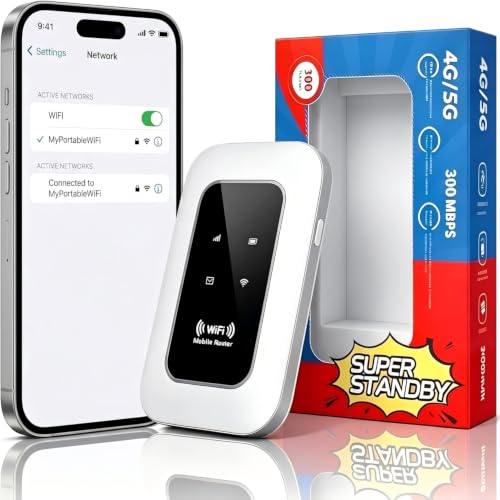
This pocket hotspot holds a SIM and shares an LTE Cat 4 connection at up to 300 Mbps. A 2100 mAh battery is listed at over 10 hours, USB-C handles charging and the unit joins 16 devices by one count and up to 20 by another.

Low on the price ladder for cellular sharing, it comes in noticeably cheaper than the FIRSTNUM C600C, and its size means it can sit anywhere in the rig. A small box near the center of a van or a short trailer gives each corner a fair path.

Because the battery runs the radio, it works on a picnic table as easily as on a shelf.

What works

  • Runs on its own battery
  • Fits in a pocket
  • Works anywhere in a short rig
  • Cheap way to get a hotspot

Watch out for

  • Bands skip B12, B13, B66, B71
  • Small box, limited reach
06
Best for: Owners turning campground WiFi into a private network for the least spend.

Our take

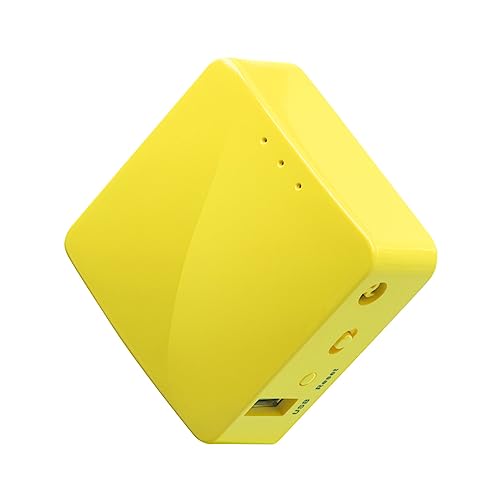
Two Ethernet ports and a USB 2.0 port let it bridge a wired park jack to a handful of devices.

Why it made the shortlist

A mini travel router, the GL.iNet Mango converts a public network, wired or wireless, into a private WiFi network for your devices. It runs OpenWrt with an OpenVPN client pre-installed, and it takes power from a laptop USB port, a power bank or a 5V adapter.

Entry-priced for the shortlist, it offers the least costly way to separate your devices from a shared campground network. The Netgear R6700AX adds WiFi 6 and a bigger reach, whereas the Mango adds an open platform and a tiny footprint.

A campground WiFi user in a short rig who wants a VPN on every device gets the most out of it.

What works

  • Turns campground WiFi private
  • Power bank or USB powered
  • Two-year warranty included

Watch out for

  • Older, slower WiFi standard
  • Small range for a long rig

Methodology

How We Built This Shortlist

Each pick was assessed across 5 criteria weighted for real-world use.

01

Interior coverage claims

We compared the coverage figures each listing states, such as square footage and antenna count, and then read them against a metal-skinned rig. A home router rated for an apartment loses range quickly behind aluminium siding and foil insulation. We treated antenna design and a 2.4 GHz band as practical tools for covering a long coach.

02

Band structure

We looked at how each router splits 2.4 GHz and 5 GHz. The 5 GHz band is faster and drops off sooner, while 2.4 GHz travels farther and carries to a back bedroom. A dual-band unit lets devices pick, so we favored listings that name both speeds.

03

Client capacity

We recorded each listed device count and treated it as a ceiling rather than a promise. A rig with phones, tablets, a TV and a work laptop needs real headroom. Where listings give two different counts, we used the lower one.

04

Internet source

We separated routers with a SIM slot from routers that need an Ethernet feed, because the guide is about the LAN side while the source varies. A home router with no modem needs a second device upstream. We noted which picks stand alone and which do not.

05

Price position

We ranked the six by relative price and tied every step up to a mechanism such as a modem, a faster standard or more ports. Every pick sits within the budget tier. We describe those steps as bands and named comparisons, never as figures.

Decision guide

Match a Budget WiFi Router for RVs to Your RV

By Rig Length

Length decides how far the signal has to travel, so match the router to the floor plan.

Rig sizeRecommended pickWhy
Van or teardropGL.iNet MangoA small box covers a short cabin with USB power
Short travel trailerNETGEAR R6700AXWiFi 6 and four wired ports for a compact layout
Mid-length trailerFIRSTNUM C600CAC1200 dual-band with a SIM and four LAN ports
Long fifth wheelDionlink 4GSix antennas and 2.4 GHz reach for the far bedroom
Large coach with meshTP-Link Archer BE230Beamforming plus EasyMesh to add a second node

By Budget

Price bands show what each step up adds across this shortlist.

Price bandRecommended pickWhat the step buys
Entry of this shortlistGL.iNet MangoA private VPN network from campground WiFi
Low band, a small step upUnlocked HotspotA SIM slot and a battery in a pocket unit
Low band, near the hotspotNETGEAR R6700AXWiFi 6 and a free setup app
Mid of this shortlistFIRSTNUM C600CA modem plus four LAN ports
Top of this shortlistDionlink 4GDual-band with failover to 4G

Standalone Router vs Router Behind a Modem

The big fork is whether the box makes its own internet or only spreads it.

Standalone with SIM

Dionlink 4G, FIRSTNUM C600C and Unlocked Hotspot carry a cellular modem. The mechanism is a SIM-fed radio inside the box, which means one purchase and one cable run.

Behind a modem

TP-Link Archer BE230 and NETGEAR R6700AX take an Ethernet feed from another source. The mechanism is a pure LAN layer, so you get stronger WiFi hardware for the money while needing a modem or park jack.

Choose Dionlink 4G if you want one box, or TP-Link Archer BE230 if a separate modem already handles the cellular side.

By Number of Devices

A client count is a ceiling, so size it against the screens you actually own.

Devices on boardRecommended pickWhy
Two phones and a laptopUnlocked HotspotLists 16 to 20 devices and runs on a battery
Four to eight devicesFIRSTNUM C600CLists 10 devices with four wired ports
Eight to twelve devicesNETGEAR R6700AXLists 20 devices on WiFi 6
A full crowd plus smart gearDionlink 4GLists 32 devices across two bands
Heavy streaming and gamingTP-Link Archer BE230Lists 60 devices on Wi-Fi 7

For Work-From-RV Specifically

A video call asks for consistency, so prioritize wired ports and failover over peak speed.

Look for

A wired LAN port for the work laptop, a failover path if the primary feed drops, and dual-band reach. Dionlink 4G offers failover to 4G and TP-Link Archer BE230 offers fast ports.

In this comparison

Dionlink 4G is the all-in-one route, TP-Link Archer BE230 is the fast LAN route, and FIRSTNUM C600C is the lower-cost SIM route with four wired ports.

When to Spend More

The extra money on this list buys coverage hardware and a modem, not just speed.

Spend more if

Your rig is long or the far room keeps dropping. Dionlink 4G and TP-Link Archer BE230 bring multiple antennas, dual-band reach and mesh options.

Save if

Your rig is short and a phone or park WiFi supplies the source. GL.iNet Mango and NETGEAR R6700AX cover that job for the least spent, and Unlocked Hotspot is a cheap cellular option.

FAQ

Before You Bring One Home

Why does WiFi fade in the back of my RV?

Aluminium siding, foil-faced insulation and metal framing reflect and absorb radio waves, so range falls much faster than in a wood-frame house. Place the router centrally and high, favor the 2.4 GHz band for the far rooms, and consider a mesh option like the one TP-Link Archer BE230 supports.

Should I join my devices to 2.4 or 5 GHz?

Use 5 GHz near the router for speed and 2.4 GHz at the far end for reach. A dual-band router such as Dionlink 4G lets each device choose. If a phone clings to a poor signal, name the two bands separately in the router settings and pick one by hand.

Do I need a router with a SIM slot?

Only if you want the box to be your internet source. FIRSTNUM C600C needs no second device, while NETGEAR R6700AX needs an Ethernet feed from a modem or park jack. If a separate cellular device already works, a home-style router adds better WiFi for less.

How do I use campground WiFi on my own network?

Use a travel router in client or public WiFi mode, such as GL.iNet Mango. It joins the park network once and your devices join the router instead. That way you sign in a single time and a VPN client protects all your gear together.

Is a bigger device count worth paying for?

Yes when you count smart plugs, cameras and streaming sticks. Routers listing 10 clients fill up early, while those listing 32 or 60 leave room. Count your devices, double the number and pick a router that lists at least that many.

Can a home router run in an RV?

Yes, with a caveat on power. NETGEAR R6700AX and TP-Link Archer BE230 are home-style units that expect a wall outlet, so an inverter must be running. Plan a small 120V path and expect the router to be a steady overnight load.

Bottom line

The short version

Browse more budget wifi routers for rvs on Amazon →
Bowen Higgins, RV Editor at RV Gear Lab

About the author

Bowen Higgins

RV Editor at RV Gear Lab

Bowen covers RV power, water systems, towing and leveling, upkeep and interior comfort, with a focus on matching gear to the rig, the hookups and the way you actually travel.

More from Bowen →Editorial standards

Keep reading

Related guides