

We research everything we recommend. When you buy through our links, we may earn a commission. Learn more

Buying guide · 11 min read · Updated October 2, 2026

5 Best Budget Portable Power Stations With UPS in 2026: A Practical RV Guide

Budget portable power stations with UPS mode, ranked by stated switchover time, inverter size and battery chemistry for routers, PCs and CPAP gear.

Bowen HigginsBy Bowen HigginsRV Editor at RV Gear Lab5 products comparedSpec-sheet researched

At a glance

Our top picks

Sold as a UPS, a power station is making a narrow promise: when the wall outlet drops, whatever is plugged into it keeps running without a reboot. That is a different job from simply storing energy, and it hinges on one number, the switchover time, which is why this guide starts there rather than with battery size or port count. A handoff of about 10 milliseconds can hold up a router, a desktop and a modem through a flicker. One that only says it switches automatically leaves you guessing about the gap.

Budget changes how you read that promise. The cheapest units in this guide are small LiFePO4 batteries with a pure sine wave AC outlet, which suits a router and laptop but was not built around a published handoff figure, so you are really buying a cheap standby battery with a plug. The mid-range adds a stated switchover and a bigger inverter. The top of this shortlist adds enough capacity to keep a home office alive for hours rather than minutes, which is the point where a UPS stops being a blip protector and becomes a genuine outage plan for a household.

We ranked these five by how clearly each listing backs its UPS claim, then by inverter headroom, battery chemistry and recharge speed. Where a listing gives no switchover figure we say so plainly, because a PC, a NAS or a CPAP machine deserves a real number before you trust it. The ordering below follows that logic, starting with the pick that states its handoff outright and working toward the units that simply store energy, so each step down the list shows you plainly what you are trading away at that price.

RV Gear Lab field notes

The Rig Fit Check

Start with the job
BLUETTI Elite 30 V2 Portable Power Station, 288Wh, 600W LFP leads this shortlist for Desk setups, routers and CPAP rigs that need a stated fast handoff.. Use that fit as a reference point, then compare the alternatives against your own space and workload.
Specs that separate the picks
The first details to compare are 288Wh LiFePO4, 600W continuous, 2048Wh LiFePO4, 2400W AC, 1,024Wh LiFePO4, 2,000W AC. Confirm the exact model and included components before ordering.
Trade-off to plan for
288Wh runs a desk for hours, not a fridge

Before you buy

What Matters Before You Choose a Budget Portable Power Station With UPS

Key buying criteria so you get the right fit the first time.

  1. 01

    Switchover Time

    Switchover time is how long the output goes dark when the wall power fails, and it decides whether a desktop reboots. Many computer power supplies can ride through a very short gap, so a handoff in the range of 10 milliseconds is generally safe for a PC, router or NAS, while a slower or unstated transfer is a gamble. Look for an exact millisecond figure in the listing bullets rather than a phrase like seamless or uninterrupted. If the listing gives no number, treat the unit as a manual standby battery and plug sensitive gear in before the outage, not during it.

  2. 02

    Pass-Through Charging

    A real UPS has to charge and power the loads at the same time, because the wall outlet is both its charger and its source. Some power stations disable AC output while charging, or switch into a lower-power mode that cannot hold a desk. Read the listing for UPS or pass-through wording, and confirm that the unit keeps the inverter on while it charges. Without this, your router would sit on the wall and the battery would stay idle through the exact event you bought it for.

  3. 03

    Continuous Watts Versus Surge

    Continuous watts describe what the inverter sustains for hours, and surge watts are a brief burst for motor startup. A router and laptop draw perhaps 60 to 100 watts, so a 300W unit is enough, but adding a monitor, a NAS and a printer pushes you toward 600W or more. Add up the nameplate wattage of everything you want protected and keep the total below the continuous rating. Resistive loads like a space heater need continuous headroom with no surge cushion, so size them honestly.

  4. 04

    Capacity and Runtime

    Watt-hours set how long the backup lasts, and a 288Wh battery is a different product from a 2048Wh one. Divide the capacity by your load in watts, then trim about 15% for inverter losses to estimate hours. A 100W desk on a 288Wh unit gets roughly two and a half hours, while the same desk on a 2048Wh unit keeps going most of a day. Decide what an outage looks like for you before choosing, since a longer runtime is the only thing that stretches a short UPS into a true outage plan.

  5. 05

    Battery Chemistry and Cycle Rating

    Typical LiFePO4 ratings run around 3,000 to 4,000 cycles, while older NMC packs fade after roughly 500 to 800. For a unit that sits on a charger for years, long life matters more than raw weight. Cycle counts are only comparable at the same depth of discharge, so look for the percentage next to the number and an end-of-life capacity such as 80%. A rating quoted at a shallow discharge flatters the figure and tells you less than it seems.

  6. 06

    AC Versus DC Outputs

    A UPS function only helps if your gear can plug into the unit. A pure sine wave AC outlet runs a standard PC power supply, a CPAP humidifier or a modem brick, while a DC-only station works with USB-C and 12V devices alone. Count the AC outlets, and check whether the listing mentions pure sine wave output, which protects sensitive electronics. If your router and modem use wall adapters, you need AC; if they run on USB-C or 12V, a DC unit can do the job.

Our standards

Why You Can Trust RV Gear Lab

At RV Gear Lab, we compare products based on rig fit and power or hookup compatibility, verified specifications, usability, setup requirements, weight, durability, and real-world trade-offs. We do not rank products purely on marketing claims or commission rates.

We have not personally tested every product listed. Where hands-on testing is not available, recommendations are based on verified manufacturer specifications, product documentation, use-case fit, and comparative research.

How we review RV gear →

Detailed reviews

The 5 best budget portable power stations with ups, explained

01
BLUETTI Elite 30 V2 Portable Power Station, 288Wh, 600W LFP
  • 288Wh LiFePO4, 600W continuous
  • 10ms UPS switchover stated
  • 380W wall charging, 9.4 lbs
Check price on Amazon for BLUETTI Elite 30 V2 Portable Power Station, 288Wh, 600W LFP (opens in a new tab)
Best for: Desk setups, routers and CPAP rigs that need a stated fast handoff.

Our take

Pick it for a home-office desk, a streaming rig, or a camper where the job is a clean handoff for modest loads.

Why it made the shortlist

The Elite 30 V2 is the one pick in this guide that puts a number on its UPS mode: a 10ms switchover when wall power drops. Behind that claim sits a 288Wh LFP battery and a 600W continuous inverter, which is generous headroom for a router, modem, laptop and monitor running together, and the 50% lower power consumption Bluetti cites for its UltraCell design stretches that battery further.

Against the Daran 288 below it, the step up buys a stated switchover time, a larger 600W continuous rating in place of 350W, and a Power Lifting mode that raises the ceiling to 1500W for resistive loads. The wall charger works at up to 380W, so a drained battery climbs to 80% in about 45 minutes, which matters when outages arrive in clusters.

At 9.4 lbs it moves from the desk to the trailer without a second thought, and its LFP chemistry is built to sit on charge for years, which is exactly how a UPS spends its life.

What works

  • Switchover time is stated at 10ms
  • 600W output with a 1500W lifting mode
  • Fast wall recharge, 80% in about 45 minutes
  • Light enough to carry one-handed

Watch out for

  • 288Wh runs a desk for hours, not a fridge
  • Lifting mode is for resistive loads, not motors
02
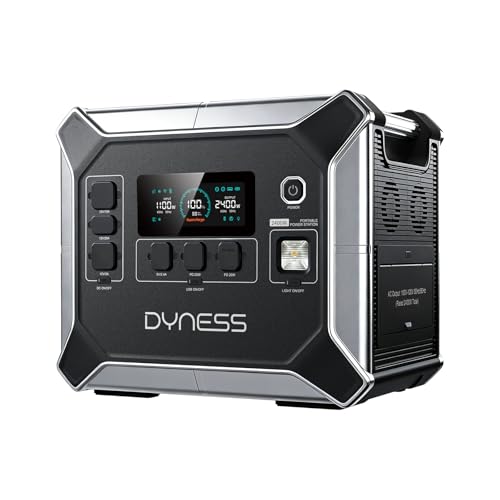
DYNESS Portable Power Station, 2048Wh, 2400W Output, LiFePO4 Battery
  • 2048Wh LiFePO4, 2400W AC
  • 6 AC outlets, 13 ports total
  • 1100W AC plus 500W solar input
Check price on Amazon for DYNESS Portable Power Station, 2048Wh, 2400W Output, LiFePO4 Battery (opens in a new tab)
Best for: Home offices and medical gear that must survive multi-hour blackouts.

Our take

Solar input stacks with the wall charger, since 1100W of AC and 500W of MPPT solar can feed it together.

Why it made the shortlist

The Dyness pairs a 2048Wh LiFePO4 battery with a 2400W inverter and a built-in UPS mode aimed at routers, computers and medical equipment. That capacity turns a brief blip protector into something that carries a modem, a workstation and a few lights through a half-day outage, with thirteen output ports including 100W USB-C and a 12V car socket for distributing the load.

Anker C1000 Gen 2 is the yardstick, and Dyness 2048Wh brings about two times the stored energy and six AC outlets, so a full desk, a monitor wall and a small fridge can all hang off one box without extension strips. LiFePO4 cells inside are rated for 4,000+ cycles, and AC charging reaches 80% in 1.8 hours with 100% at 2.3 hours.

Consider this the sensible stopping point for a household that wants outage runtime first and a UPS function second, and the large battery means each outage uses up a thin slice of its 4,000 cycle life.

What works

  • Huge capacity for all-day backup
  • Six AC outlets for a full workstation
  • 4,000+ cycle LiFePO4 chemistry
  • Recharges to 80% in 1.8 hours

Watch out for

  • Listing gives no switchover time in milliseconds
  • Too heavy to carry casually
  • Most expensive pick here by a wide margin
03
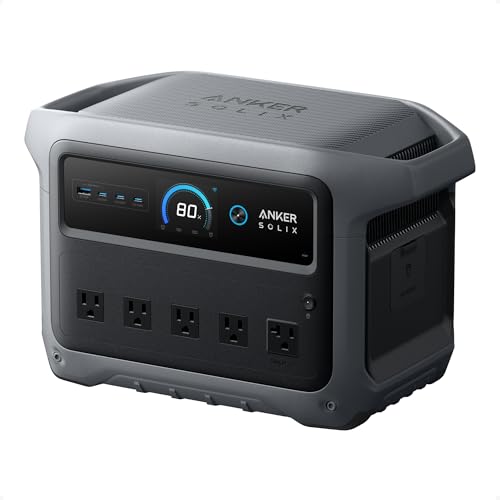
Anker SOLIX C1000 Gen 2 Portable Power Station, 1,024Wh, 2,000W
  • 1,024Wh LiFePO4, 2,000W AC
  • 49 minute full charge at 1,600W
  • 600W solar input, 10 ports
Check price on Amazon for Anker SOLIX C1000 Gen 2 Portable Power Station, 1,024Wh, 2,000W (opens in a new tab)
Best for: Remote workers who want quick turnaround between back-to-back outages.

Our take

The battery holds at least 80% capacity after 4,000 cycles, which Anker frames as ten years of regular use through its InfiniPower design and a long service life of roughly a decade.

Why it made the shortlist

The C1000 Gen 2 combines a 1,024Wh LiFePO4 battery with a 2,000W inverter that peaks at 3,000W, and Anker lists it for UPS use alongside emergency backup. HyperFlash charging pulls 1,600W from the wall, which brings the battery to full in 49 minutes when enabled in the app, and that speed is the main reason to choose it.

Dyness 2048Wh makes the cleanest comparison, since Anker C1000 trades half the capacity for a lighter, more compact body that Anker describes as 14% more compact and 11% lighter than similar models, so it carries from room to room with less fuss and fits on a shelf. Ten output ports cover laptops, a router and a monitor, while 600W of solar input at up to 60V refills it in about 1.8 hours, so a sunny afternoon after an outage restores the whole battery.

Anker C1000 suits a remote worker who wants the fastest possible comeback after an outage rather than the longest possible runtime, with enough output to run a desk and a small appliance together.

What works

  • Full recharge in 49 minutes via the app
  • 2,000W output with 3,000W peak
  • Rated 80% capacity after 4,000 cycles
  • Compact for its capacity

Watch out for

  • No switchover time in milliseconds is stated
  • Fast charging must be switched on in the app
04
Anker SOLIX C300 DC Portable Power Station, 288Wh, 300W, LiFePO4
  • 288Wh LiFePO4, 300W DC
  • Two 140W two-way USB-C ports
  • 120W car socket, no AC outlet listed
Check price on Amazon for Anker SOLIX C300 DC Portable Power Station, 288Wh, 300W, LiFePO4 (opens in a new tab)
Best for: Powering a router, modem or camera over USB-C and 12V during outages.

Our take

The LiFePO4 cells, smart temperature control and impact-resistant shell are built for years of standby.

Why it made the shortlist

The C300 DC is built around USB-C and 12V rather than a wall socket, which makes it the odd one out in a UPS guide. Two 140W two-way USB-C ports, a 100W port, a 15W port, two USB-A ports and a 120W car socket let a DC-powered router, laptop and phone stay alive from a 288Wh LiFePO4 battery.

Bluetti Elite 30 makes the cleanest comparison, since Anker C300 drops the AC inverter and in exchange delivers 300W of efficient DC output in a body Anker rates 30% more compact than similar stations, so it slips into a van cubby. Charging works from an 18W or higher USB-C wall charger, or at up to 140W over USB-C, so it refills from chargers you already own, and the two-way ports let it charge a laptop quickly and take power back in just as readily.

It fits a buyer whose critical gear already runs on USB-C or 12V, such as a travel router, an LTE modem or a laptop, and who wants a tidy battery that holds up a connection without any AC conversion losses.

What works

  • Two 140W USB-C ports charge laptops fast
  • Compact body, about 30% smaller than rivals
  • LiFePO4 cells built for years of standby
  • Refills from an ordinary USB-C charger

Watch out for

  • No AC outlet is listed, so wall-plug gear will not run
  • UPS wording applies to DC loads only
  • Carry strap is sold separately
05
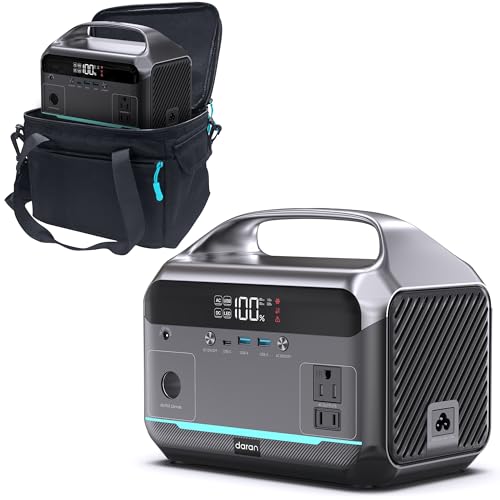
DaranEner Portable Power Station, 288Wh LiFePO4, 350W (600W Peak)
  • 288Wh LiFePO4, 350W AC
  • 2 AC outlets, 60W USB-C PD
  • 8.2 lb, 10.0 x 6.6 x 8.2 in
Check price on Amazon for DaranEner Portable Power Station, 288Wh LiFePO4, 350W (600W Peak) (opens in a new tab)
Best for: Budget buyers wanting a manual standby battery for a router and laptop.

Our take

Use it as a manual standby: plug the router into it at the first flicker and keep working through the outage.

Why it made the shortlist

The Daran 288 is the entry pick here and the cheapest way into a LiFePO4 power station with a pure sine wave AC outlet. A 288Wh battery feeds two 350W AC outlets (600W surge), a 60W USB-C PD port and two 18W USB-A ports, enough to run a router, a laptop and a phone for hours, with a seventh port on the side for DC gear.

In exchange you get an 8.2 lb body measuring 10.0 x 6.6 x 8.2 inches, a seven-port layout and a battery management system covering overcharge, over-discharge, short circuit, temperature and cell balancing protection.

What works

  • Pure sine wave AC at 350W continuous
  • Light and compact at 8.2 lb
  • Full set of battery protections

Watch out for

  • No UPS mode or switchover time is claimed
  • 350W limit rules out kettles and heaters

Methodology

How We Built This Shortlist

Each pick was assessed across 5 criteria weighted for real-world use.

01

How We Read the UPS Claim

We compared each listing's UPS wording first. A stated switchover time in milliseconds earned the most credit, a bare mention of automatic switching earned less, and a unit with no UPS claim was treated as a manual standby battery. We evaluated this from product specs, not bench measurements.

02

Inverter Headroom

We looked at continuous and surge watts against the loads a UPS actually protects, such as routers, desktops, monitors and NAS boxes. A bigger inverter lets one unit cover a whole desk without tripping on startup. We kept continuous and surge ratings separate throughout.

03

Battery Chemistry and Cycle Life

Every pick uses LiFePO4, so the comparison moved to cycle ratings and how they are quoted. Cycle counts are only comparable at the same depth of discharge, so we noted where the listing states its end-of-life capacity. A battery that sits on float charge for years benefits most from long-life cells.

04

Recharge Speed and Inputs

Outages often arrive in clusters, so we weighed wall charging watts, solar input and the time to 80%. We also noted which units take USB-C input. We based this on stated figures from the listings.

05

Value at This Budget

We positioned each pick within the shortlist by price band and asked what the step up actually buys: capacity, a stated switchover, a bigger inverter or faster charging. Picks were rewarded when the extra cost bought a mechanism you can use. Price figures are left out because they change daily.

Decision guide

Match a Budget Portable Power Station With UPS to Your RV

By Switchover Promise

The label says UPS on most of these, but the evidence behind it varies. Match your tolerance for a power blip to what the listing actually states.

If you needBest pickWhy
A stated millisecond handoff for a PCBluetti Elite 30Only listing here that publishes a 10ms switchover
Automatic switching for a home officeDyness 2048WhBuilt-in UPS mode, with the timing left unstated
Backup for USB-C and 12V devicesAnker C300DC outputs only, no AC handoff to worry about
A manual standby you plug in yourselfDaran 288No UPS claim, so treat it as a battery bank
Fast recovery between outagesAnker C100049 minute full recharge when enabled in the app

By Budget

The price ladder in this guide tracks capacity and inverter size more than the UPS feature itself.

Budget bandBest pickWhat it buys
Entry of this shortlistDaran 288288Wh LiFePO4 with 350W AC, no UPS mode claimed
Low-mid of this shortlistAnker C300DC-only 300W with fast USB-C charging
Mid of this shortlistBluetti Elite 30Stated 10ms UPS and 600W output
Upper-mid of this shortlistAnker C10001,024Wh and 2,000W, rapid recharge
Top of this shortlistDyness 2048Wh2048Wh and 2400W for long outages

Small Standby vs Whole-Desk Backup

The real decision is whether you want a compact blip protector or a battery that can run a workspace for hours.

Small standby (288Wh class)

The Bluetti Elite 30, Anker C300 and Daran 288 cover routers, laptops and CPAP gear for a few hours. They are light enough to carry between rooms and cheap enough to leave plugged in permanently.

Whole-desk backup (1000Wh and up)

The Anker C1000 and Dyness 2048Wh power a desktop, monitors and a modem for an afternoon or longer. The Dyness 2048Wh adds six AC outlets so more of the setup can stay live.

Pick the Bluetti Elite 30 for a stated handoff on modest loads, or the Dyness 2048Wh when runtime comes first.

By Recharge Path

A UPS that takes ages to refill leaves you exposed to the next outage, so check how each one gets its energy back.

Recharge priorityBest pickWhy
Fastest wall chargeAnker C10001,600W HyperFlash brings it to full in 49 minutes
Quick top-up from a small unitBluetti Elite 30380W wall charging, 80% in about 45 minutes
Solar plus wall togetherDyness 2048Wh1100W AC and 500W MPPT solar can stack
Charge from a laptop USB-C brickAnker C300Accepts 18W and up, up to 140W over USB-C
Slow and simple overnight refillDaran 288AC wall input of up to 150W, plus car and solar

For Work-From-Home and Camper Use Specifically

The same box that holds up a desk at home can keep a camper's Wi-Fi alive, but the best choice shifts with the loads.

Look for

A pure sine wave AC outlet, a stated switchover or at least a UPS mode like the Bluetti Elite 30 offers, and enough continuous watts for a router, laptop and monitor together. Pass-through wording matters most, since the unit has to charge while it runs.

In this comparison

The Bluetti Elite 30 is the best match for a desk or CPAP rig, the Anker C300 suits a van with a USB-C router, and the Dyness 2048Wh handles a whole home office where outages last for hours.

When to Spend More

Stepping up the shortlist buys either handoff clarity or runtime, so spend where your risk sits.

Spend more if

You run a NAS, a work desktop or medical equipment, where a reboot costs real data or health. The Bluetti Elite 30 adds a stated 10ms handoff, and the Dyness 2048Wh adds the capacity to ride out a long blackout.

Save if

You only need to keep a router and laptop alive through short outages. The Daran 288 or Anker C300 covers that, and the savings are best spent on a second cable or a solar panel.

FAQ

Before You Bring One Home

What is the difference between a UPS and a portable power station?

A true UPS sits between the wall and your device and switches to battery in milliseconds, so nothing reboots. A standard power station only provides battery power when you plug into it. Some power stations include a UPS mode that does both jobs at once, which is the feature this guide is built around.

Will a 10ms switchover keep a desktop computer running?

Often yes, because desktop power supplies can ride through a very brief gap on their own. A handoff around 10 milliseconds is generally fast enough for a PC, router or NAS. Sensitive or older equipment may still reboot, so test it once by pulling the plug while you are at the desk.

Do I need AC outlets, or is a DC-only unit enough?

It depends on how your gear is powered. A router that runs on USB-C or 12V can be backed up by a DC unit like the Anker C300. Anything that uses a wall adapter, including most desktops and modems, needs a real AC outlet.

Why does the Dyness 2048Wh not list a switchover time?

The listing describes a built-in UPS that switches automatically but does not give a millisecond figure. Ask the seller or check the manual before relying on it for a NAS or workstation. Until you have a number, treat it as strong outage backup first and a UPS second.

How long will 288Wh keep a router and laptop alive?

Add up the wattage of your gear, divide 288 by that total, then take off about 15% for inverter losses. A 70W router and laptop combination lands near three and a half hours. A larger unit like the Anker C1000 stretches the same load into most of a day.

Is it safe to leave a power station plugged in all the time?

LiFePO4 units are designed to sit on charge, and each pick here has a battery management system that guards against overcharge and overheating. Keep the unit in a ventilated spot away from heat, and cycle it occasionally so the battery stays exercised. Follow the manufacturer's guidance on storage charge level.

Bottom line

The short version

Browse more budget portable power stations with ups on Amazon →
Bowen Higgins, RV Editor at RV Gear Lab

About the author

Bowen Higgins

RV Editor at RV Gear Lab

Bowen covers RV power, water systems, towing and leveling, upkeep and interior comfort, with a focus on matching gear to the rig, the hookups and the way you actually travel.

More from Bowen →Editorial standards

Keep reading

Related guides